


PDF Reader - All PDF Scanner
4.3368.00 Reviews
App Specs
- Version
- 1.1.8
- Updated On
- License
- Free
- Downloads
- 1,000,000+
- Developer
- Dev Globeg
- Categories
- Productivity
- Platform
- Android
Screenshots
 Analysis by AppCompare
I often need a PDF app for a small, practical job: opening a document someone sent me, checking a page, and keeping the file easy to find later. PDF Reader - All PDF Scanner is aimed at that kind of everyday use. Its central appeal is local-file management: it focuses on handling PDFs already on your device, rather than asking me to build a complicated document system around them. That makes it a sensible option when I want a straightforward reader and editor in one place.
Why local PDF handling matters
A local-file workflow is useful when a document arrives by email or messaging app and I simply need to review it, make a change, then return to whatever I was doing. Instead of treating every PDF as part of a cloud workspace, the app is positioned around managing files stored on the device. For people who keep forms, receipts, class notes, or reference documents in local folders, that emphasis can make the basic task feel direct: open a file, work with it, and keep it organized alongside other documents.
This is also a helpful distinction when choosing between a dedicated PDF tool and a broader office suite. A full office app may be the better fit for editing documents across formats or collaborating on a team project. A focused PDF reader makes more sense when the file is already a PDF and the job is to read or manage that file without turning it into a larger productivity routine.
How I would use it during a normal day
Imagine I receive a travel confirmation or a form while away from my desk. I can open the PDF on my phone, check the details before I leave, and keep the file available for later rather than searching through a long message thread again. The same basic pattern works for a student reviewing a handout between classes or a renter keeping a copy of a document close at hand. The value is less about a dramatic transformation and more about reducing the little interruptions involved in finding and revisiting PDFs.
A practical habit is to decide where a file should live before opening it. If I download several attachments into an already crowded folder, a reader can display them without solving the underlying filing problem. Naming files clearly and keeping related documents together will do more for future retrieval than expecting any PDF app to compensate for messy storage. That is a useful trade-off to understand: this app’s local-file focus suits people who are comfortable keeping documents on their device, but it does not replace a deliberate backup or filing routine.
Where it fits among alternatives
For quick viewing, a phone’s built-in document preview may already be enough. I would use that when I only need to glance at one attachment and have no reason to keep returning to it. A dedicated reader becomes more appealing when PDFs are a regular part of my day and I want a tool centered on them rather than a general file viewer. On the other hand, people who need shared folders, synchronized work across devices, or a deep set of specialist editing controls should compare this approach with a cloud document service or a more advanced PDF suite.
The choice depends on the job, not on which app has the longest feature list. If the main goal is to read and manage local PDFs, a focused app can avoid the extra menus of a larger productivity package. If the goal is to coordinate edits with colleagues or maintain a shared archive, a local-first reader may not be the best center of that workflow. I would choose the simplest tool that covers the task I actually repeat.
Worth Reading Before You Choose

EA SPORTS FC Mobile 26 Is a Bigger Football Game, but It Takes Time

Flipboard Shows What News Apps Must Do Beyond the Feed

Switching to Android Auto Means Rethinking Your Driving Routine

Google Calendar Makes a Crowded Week Easier to Manage

Ludo King Makes the Most of the Minutes Between Plans

Baby Panda World Brings Quick Play to Modern Phones, but Its Game Library Feels Busy
Who is likely to get the most from it
I would point casual PDF users, students with documents saved on their phones, and people who regularly check household or work paperwork toward this kind of app. It is especially relevant if you prefer having files available locally instead of relying on a more elaborate online workspace. Dev Globeg has placed the app in the productivity space, and its free price makes it easy to consider for routine document handling. It is rated for Everyone, so its audience is broad rather than limited to a specialist profession.
It may be less suitable if your PDFs are only occasional, since the preview already built into a device could cover that need. I would also look elsewhere if your workflow depends on features such as coordinated team review or a particular business document system. Before settling on any PDF tool, I recommend trying it with the kinds of files you actually use: a text-heavy document, a form, and a file with pages you need to revisit. That small test quickly shows whether its handling and organization match your habits.
So, you've been on the hunt for a reliable PDF reader that won't make you pull your hair out? Let me introduce you to the PDF Reader - All PDF Scanner. This app promises to be your go-to for all things PDF-related, and after giving it a whirl, I've got some thoughts to share. Let's dive into what makes this app tick and whether it's worth the download.
Getting Started with the app
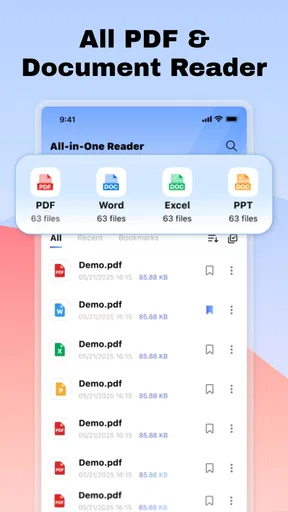
First off, downloading and setting up the PDF Reader - All PDF Scanner is a breeze. It's available on both Android and iOS, so no matter your device allegiance, you're covered. Once you fire it up, the interface greets you with a clean, intuitive design. No clutter, no fuss—just a straightforward layout that even your grandma could navigate.
Features That Stand Out
Now, let's talk features. This app isn't just about reading PDFs; it's packed with tools that make managing your documents a whole lot easier. One of the standout features is its powerful scanning ability. Seriously, you can turn any physical document into a crisp, clear PDF in seconds. Just snap a pic, and voilà, you've got a digital copy ready to share or store.
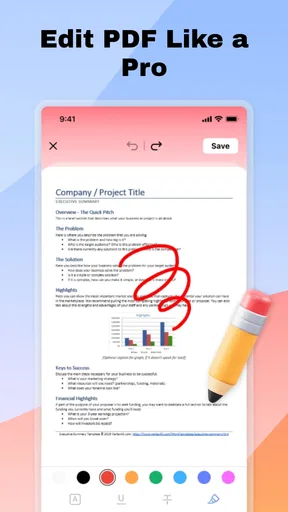
Another nifty tool is the annotation feature. Need to highlight text or leave notes for later? No problem. The app lets you mark up your PDFs with ease. And if you're someone who handles a lot of forms, you'll appreciate the ability to fill them out directly within the app. No more printing, signing, scanning, and emailing back—thank goodness for that!
Performance and User Experience
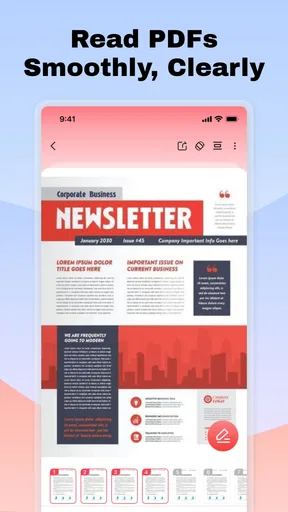
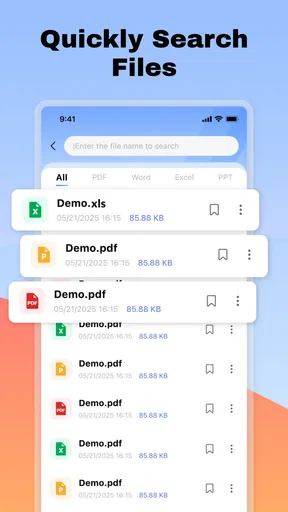
Performance-wise, the app runs smoothly. I didn't experience any lag or crashes, even when handling larger PDF files. The developers have clearly put some effort into ensuring a seamless user experience. Navigating through documents is fast, and the search function is particularly handy for finding specific content within your PDFs.
One thing that impressed me was the app's ability to handle multiple PDF formats. Whether it's a standard document, a presentation, or a form, the app displays everything perfectly. The text is always sharp, and images retain their quality, which is a big plus for those of us who rely on visuals in our documents.
Security and Privacy
In today's digital world, security is a big deal. The PDF Reader - All PDF Scanner offers password protection for your sensitive documents, which provides an extra layer of peace of mind. It's comforting to know that your information stays secure, whether you're storing personal files or confidential business documents.
Is It Worth the Download?
Alright, time for the million-dollar question: Should you download the PDF Reader - All PDF Scanner? If you're looking for an all-in-one PDF solution that combines reading, scanning, annotating, and securing your documents, then absolutely. It's a robust app that's easy to use and delivers on its promises.
Of course, no app is perfect. While the free version offers a solid range of features, be prepared for some ads and potential upsells for premium features. But in my experience, the free version packs enough punch for everyday use.
The app has an average rating of 4.4 from around 3,100 ratings, with 84 written reviews, and has passed 500,000 installs. It was released on September 28, 2025, and the current version is 1.1.0; it requires Android 8.0 or newer. Those figures suggest that it has found an audience, though I would still judge it by how comfortably it handles the files and tasks I use most.
In conclusion, the PDF Reader - All PDF Scanner is a reliable choice for anyone who regularly interacts with PDFs. Whether you're a student, professional, or just someone who likes to keep their digital life organized, this app has got you covered. Give it a try, and see how it fits into your workflow. It might just become your new favorite tool.
Pros
- User-friendly interface for quick navigation.
- Supports multiple file formats besides PDF.
- Offers offline access for reading without internet.
- Annotation tools enhance productivity and note-taking.
- Quick search function improves document handling.
Cons
- Ads can interrupt the user experience.
- Limited features in the free version.
- Occasional lag with large files.
- Some advanced tools require in-app purchases.
- No cloud integration for file backup.
FAQs for PDF Reader - All PDF Scanner
What features does PDF Reader - All PDF Scanner offer?
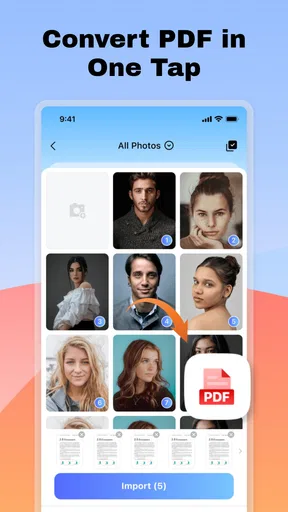
PDF Reader - All PDF Scanner is equipped with a range of features including the ability to view, edit, and annotate PDF documents. It provides advanced text recognition (OCR) for scanning physical documents into digital format, merging multiple PDFs, and converting files to other formats like Word or Excel. The app also offers cloud storage integration for easy file sharing.
Is PDF Reader - All PDF Scanner free to use?
PDF Reader - All PDF Scanner offers a free version with basic features suitable for everyday tasks. However, to access premium features such as advanced editing tools, enhanced OCR capabilities, and cloud integration, users might need to purchase a subscription or one-time payment. The app often provides a trial period for premium features.
How secure is PDF Reader - All PDF Scanner?
Security is a priority for PDF Reader - All PDF Scanner. The app employs encryption to protect sensitive documents and offers password protection for individual files. Additionally, it supports secure cloud storage options, ensuring that your documents are safe from unauthorized access. Always review the app’s privacy policy for detailed information on data handling.
Can PDF Reader - All PDF Scanner handle large files?
Yes, PDF Reader - All PDF Scanner is designed to handle large PDF files efficiently. The app optimizes performance to ensure smooth navigation and editing of bigger documents without lag. However, device specifications and available storage can impact performance, so it's advised to close other apps when working with particularly large files.
Is PDF Reader - All PDF Scanner compatible with both Android and iOS devices?
PDF Reader - All PDF Scanner is available on both Android and iOS platforms, making it accessible for a wide range of users. The app is optimized for mobile and tablet devices, ensuring a consistent user experience across different operating systems. Users can download it from Google Play Store for Android and the App Store for iOS devices.


